 Zoetrope
Timeline and tweens
The timeline is where things change over time. Each row is a layer; each cell is a frame; a filled dot is a keyframe.
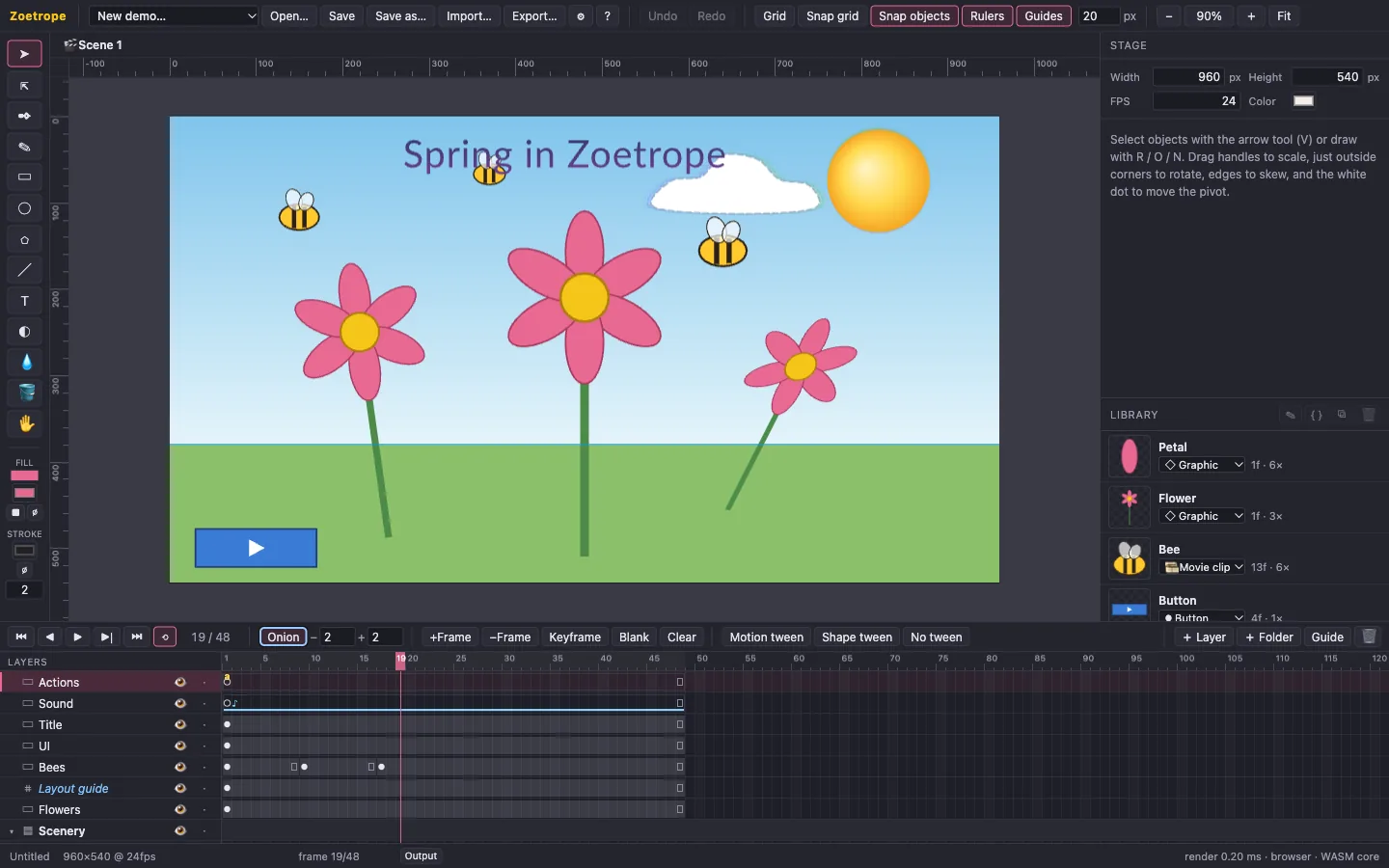
Layers
- + Layer adds a layer above the active one; + Folder groups layers; 🗑 deletes the active layer.
- Double-click a name to rename it. Drag rows to reorder them or drop them into folders. Higher rows draw on top.
- The eye hides a layer; the dot locks it so you can't select its objects by accident.
- Guide turns a layer into a guide layer. It's visible while editing, for sketches and layout lines, but is never exported.
- Mask turns a layer into a mask (◪): the layer below moves inside it and shows only where the mask's shapes are, like looking through a cut-out. Drag more layers into the mask to mask them too, or out to release them. While the mask is unlocked you see and edit its shapes; lock it to see the effect. Exports always show it masked. Fills, text and bitmaps (as rectangles) count; strokes don't, and the mask's shapes can be animated with tweens for reveals and spotlights. Click Mask again to turn it back into a normal layer.
Frames and keyframes
A keyframe is where a layer's content changes. Between keyframes, the layer holds or tweens its content. Click a cell to select that frame, then:
| Command | Key | Effect |
|---|---|---|
| Insert frame | F5 | Lengthens the span (or extends the layer to this frame). |
| Remove frame | Shift F5 | Shortens the span. |
| Keyframe | F6 | New keyframe here with a copy of the current content, ready to pose. |
| Blank keyframe | F7 | New empty keyframe. |
| Clear keyframe | Shift F6 | Merges the keyframe into the previous span. |
Play with Enter, step with , and ., jump with Home and End. The frame rate is set in the stage properties.
Tweens
Select a frame inside a span that is followed by another keyframe, then click Motion tween or Shape tween (or choose one under Tween in Properties).
- Motion tweens interpolate position, scale, rotation, skew, pivot, opacity and tint. They work on anything, and are the usual choice for symbols. Spins adds full turns.
- Shape tweens also morph shape geometry, fills and strokes. Rectangles tween to rectangles parametrically; different shapes are converted to paths and morphed point by point.
- Objects are paired across the two keyframes by identity: a keyframe made with F6 copies its objects, so they pair up automatically.
Easing
Under Easing choose Linear, a preset (In, Out and In Out variants of Quad, Cubic, Sine, Back, Bounce and Elastic), or Custom (bezier) and drag the two handles. The curve plots progress over the span.
Onion skin
Onion shows faded neighbouring frames: earlier in blue, later in green. The two numbers set how many on each side. Locked layers aren't onion-skinned, which is handy for backgrounds.
Frame labels and scripts
In the frame's Label & script section you can name a keyframe (shown as ⚑name in the timeline) and attach a script (shown as a). Scripts jump to labels with gotoAndPlay("name"). See Scripting.